
Senior Tech News issue #2
The Senior Tech News, your go-to resource for technology and cybersecurity guidance tailored specifically for seniors.

Your Feedback Matters!
Since the launch of the premier issue of the Senior Tech News, we have received some positive and constructive feedback from our subscribers. One constant piece of feedback that we received is keeping the articles short and concise. In today’s world of overflowing email inboxes, “short and to the point” should be a priority and we will strive to make that a key priority for each article we write.
Keep that great feedback coming as your input and suggestions will help us to create content that is informative and engaging. If you have a suggestion please let us know by leaving a comment.
The Senior Tech News will never share your email address and you can unsubscribe at anytime.
Master Your Digital Fortress: The Art of Password Management.
Passwords have become an integral part of our lives. From social media accounts to online banking, the need for strong, unique passwords has never been more important. Maintaining good password hygiene is vital to protect your personal and sensitive information from unauthorized access. Unfortunately, humans are prone to using weak passwords or reusing them across multiple platforms, which poses significant security risks. Remembering complex and unique passwords for each account can be overwhelming, leading users to resort to bad practices such as writing them down or using easy-to-guess variations.
Fortunately, the advent of password managers has revolutionized the way we handle passwords. By centralizing and automating the password management process, these tools offer a convenient and secure solution to alleviate the complexity of creating and storing secure passwords.
Password managers securely store all your passwords in an encrypted database, which is protected by a master password.
With a password manager, you only need to remember a single master password to access all your other passwords. This eliminates the need to memorize or write down numerous complex passwords, allowing you to use unique and robust passwords for each account.
Password managers include a built-in password generator that creates long, random, and highly secure passwords for you. This feature helps ensures that each of your accounts has a unique and robust password, minimizing the risk of unauthorized access.
One of the most significant advantages of password managers is their ability to auto-fill login credentials for websites and applications. This feature saves you time and eliminates the hassle of typing passwords manually.
So which password manager is the best? The two I recommend are 1Password and LastPass. 1Password offers a 14-day free trial and LastPass offers a 30-day free trial. This way you can test drive one or both to determine which one works best for you.
Once you start using a password manager you will wonder how you ever got by without one.
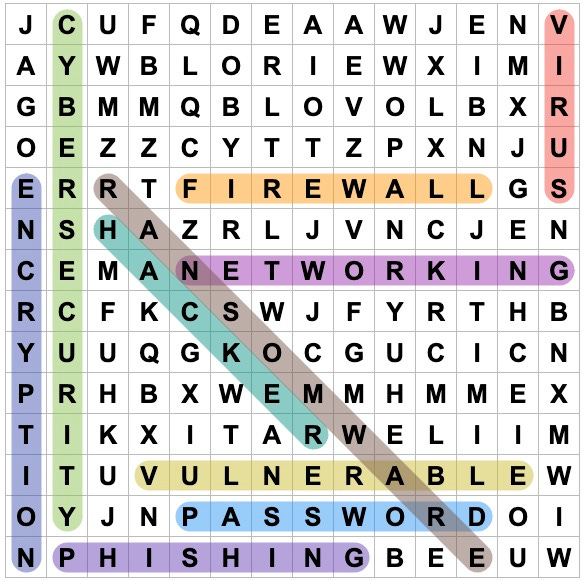
Cyber Word Search.

Can you find the cybersecurity related words hidden in the word search grid? Search vertically, horizontally, and diagonally to uncover the ten words. Get ready to test your observation skills and find these cybersecurity words! Good luck cyber sleuth!
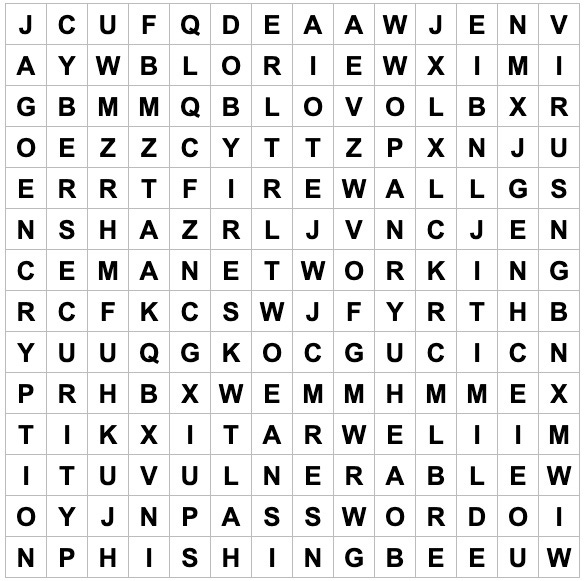
*Answer key at the end of the newsletter.
Share the Senior Tech News

Do you know someone who might enjoy reading the Senior Tech News, please share a copy with them. Thank you!
The Senior Tech News will never share your email address and you can unsubscribe at anytime.
The Threat of Government Imposter Scams
Government imposter scams involve fraudsters posing as government officials or representatives from agencies such as the Internal Revenue Service (IRS), Social Security Administration (SSA), Medicare, or law enforcement agencies like the FBI. These scams often aim to exploit seniors' fears, confusion, or lack of understanding about official government procedures.
Medicare scams against seniors typically involves fraudsters targeting individuals who are eligible for or enrolled in the Medicare healthcare program. These scams aim to deceive seniors into providing their personal information, such as Medicare numbers, to commit identity theft, fraudulent billing, or other illegal activities.
IRS scams are most common during tax season, fraudsters posing as representatives from the IRS will call claiming there is an issue with your tax return. They will say you owe back taxes and penalties and you need to pay the back taxes and penalties to avoid paying additional penalties or going to jail.
Social Security scams against seniors involves fraudsters claiming your social security number and payments have been suspended. To reinstate your social security number and payments, the fraudsters will demand a payment usually in the form of a gift card.
Remember, most Government agencies will almost never reach out to you over the phone. If they do call, hang up and call the agency’s official phone number.
Do you have a question for us?
If you have a question or a topic that you would like us to address in an upcoming issue, please leave a comment. We review all comments and will try our best to address your questions in an upcoming issue of the Senior Tech News. Thank you!
Word Search Answers
Thank you for this great information! I will share it with my friends!